PDF to Excel Converter
Upload a statement, report, schedule, or scanned PDF. Recover rows and columns, review the detected tables, and download them as an Excel workbook.
Each detected table can be placed in its own worksheet when you download the Excel file.
Move PDF tables into an editable Excel workbook
Extract table structure from native or scanned PDFs, then continue cleaning, sorting, and analyzing the data in Excel.
Excel-ready Table Output
Extract rows and columns from PDF tables and prepare the result for Excel or spreadsheet workflows.
PDF Table Extraction
Detect table-like content in PDF pages before converting it into structured data.
Scanned PDF Support
Use OCR to read tables from scanned PDFs and image-based PDF pages.
Multi-page PDF Processing
Process table data across multiple PDF pages when working with reports, statements, or document packets.
Image to Table
Need table extraction from a photo or screenshot instead of a PDF? Use image table OCR.
PDF to Text
Extract regular document text from PDF files when the page is not mainly table-based.
PDF to Excel conversion examples
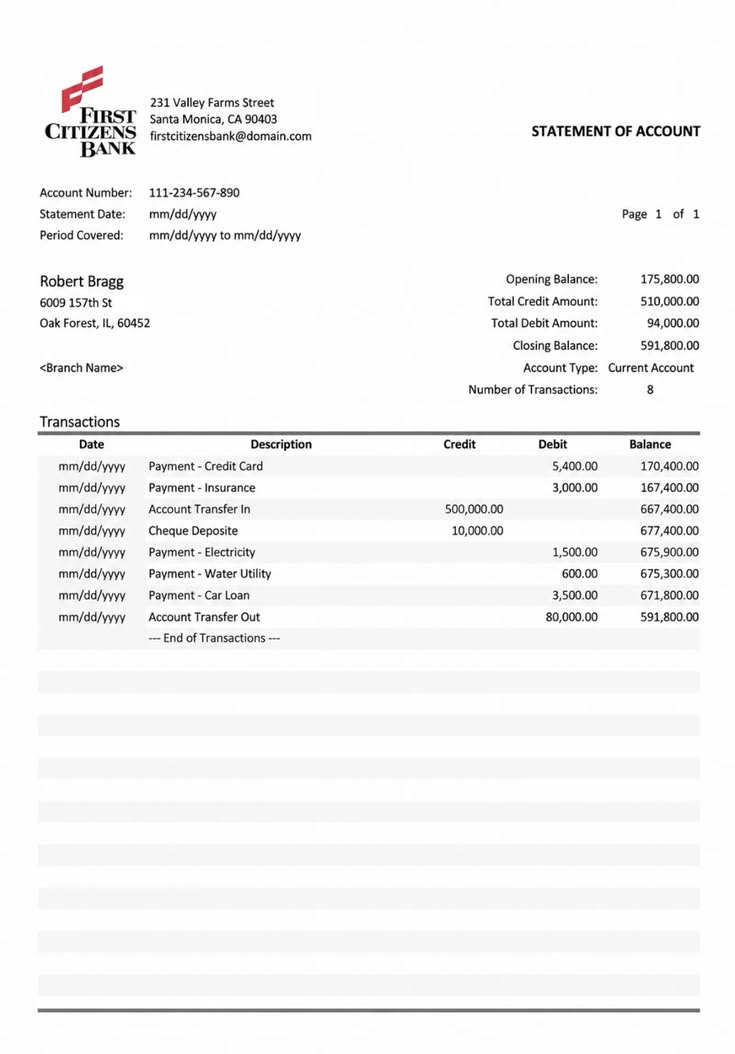
How it works
Upload a PDF, extract table data, and prepare it for Excel.
Upload your PDF
Add a report, statement, invoice page, schedule, research table, or scanned PDF that contains table data.
Extract table structure
The OCR engine reads the PDF page, detects table content, and prepares rows and columns for review.
Use the spreadsheet output
Review the extracted data, correct any unclear cells, then copy or export the table for Excel-style workflows.
What the Excel conversion preserves
The converter focuses on table values and worksheet structure, not the visual layout of the original PDF page.
| May need cleanup | Designed to preserve |
|---|---|
| Merged cells and nested table headers | Detected rows, columns, and cell text |
| Charts, logos, and decorative page layout | Multiple tables as separate worksheets |
| Formulas that are only shown as final values | Page headings as worksheet name hints |
| Rotated labels and handwritten corrections | Editable values in an XLSX workbook |
Built for real-world PDF spreadsheet tasks
Use PDF to Excel when table data is trapped inside PDF reports, statements, schedules, or scanned business documents.

Converting reports and statements
Extract rows and columns from financial reports, account statements, expense summaries, and recurring PDF tables.

Reusing business table data
Move inventory lists, order sheets, schedules, price lists, logs, and operational tables into spreadsheet workflows.

Reviewing research and records
Turn tables from research PDFs, public records, scanned forms, and archive documents into data you can clean and analyze.
FAQ
Common questions about converting PDF tables to Excel-ready data.
What is PDF to Excel?
Can it convert scanned PDFs to Excel?
How is this different from PDF to table?
Can it handle multiple tables in one PDF?
Does it create a real Excel file?
Will the Excel output be perfectly formatted?
How should I check numbers after converting a PDF to Excel?
Can I copy the extracted data?
What kinds of PDFs work best?
Are uploaded PDFs stored?
Convert PDF tables to Excel-ready data
Upload a PDF report, statement, schedule, or scanned table and prepare rows and columns for spreadsheet use.